Last updated:
How to Change Your Instagram Username
Here’s how to change your Instagram username in the app or on a computer. Instagram gives you two routes, Edit profile and Accounts Center, and you can change your name in either one. We also cover what Instagram says about your old username, and the limits people quote that Instagram’s main help pages don’t mention.
The facts about Instagram below come from its Help Center, checked on November 17, 2026.
Quick Answer
In the Instagram app, tap Profile, then Edit profile, change your username and tap Done. On a computer, click your profile picture, then Edit profile, change it and click Submit.
Instagram’s Help Center says your username changes immediately if the name is available. Accounts that reach a lot of people may have the change reviewed first. Your followers may also be notified.
Username vs Name: Which One Do You Want to Change?
Your Instagram account has two names, and people often mix them up. Your username, also called your handle, is your @name. Your name, often called your display name, is a separate field. In this post, “username” always means the @name.
Instagram’s help page lists name, username and profile picture together, and you change them all in the same places.
| Username | Name | |
|---|---|---|
| What it is | Your @handle | Your display name |
| Where to change it | Edit profile or Accounts Center | The same places |
| Review for large accounts | Instagram says the change may be reviewed | Instagram’s page doesn’t say |
| Followers notified | Instagram says they may be | Instagram’s page doesn’t say |
Only one account can use a username at a time. Even when the account using it seems inactive, Instagram’s advice is to choose an available version of the name.
You may have read that Instagram lets you change your name only twice in 14 days. That rule isn’t on the Instagram Help pages we checked for regular accounts. More on that under “Can You Change Your Instagram Username Anytime?” below.
Check the New Username First
Instagram won’t switch you to a name another account already uses. You can check an Instagram username before you switch with our free checker. It needs no login, and checking a name doesn’t reserve it.
The checker first tests the name against its format rules: up to 30 characters, only letters, numbers, periods and underscores, and no period at the start or end. These are the rules our checker applies, not wording from the Instagram Help pages we read. If the name passes, the checker tries a live lookup of the public profile.
Here’s what the results mean:
- Available means our check found no public profile at that name. It doesn’t promise Instagram will accept it. Our check can’t see deactivated or recently deleted accounts, so a name can look free and still be refused.
- Taken means an account already uses the name.
- Unknown means Instagram blocked the automated check. That happens to most checks right now, so you’ll usually see Unknown.
When the result is Unknown, the Check manually button opens that name on Instagram so you can look yourself. Instagram has the final say when you save the change, so keep a second choice ready.
In our test on November 17, 2026, the checker showed Unknown for nightowl_dev, with the Check manually button next to the result.
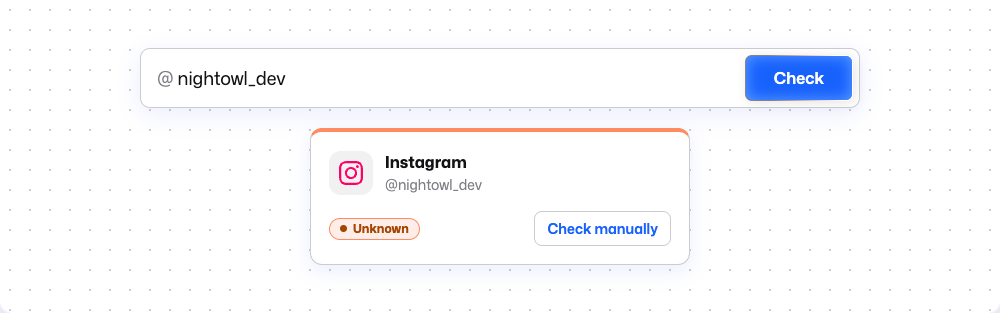 Our Instagram username checker on November 17, 2026. Instagram blocked the automated lookup, so the result is Unknown and Check manually opens the name on Instagram.
How to Change Your Instagram Username on the App
Instagram’s help page on changing your profile information gives two routes. They are the same on iPhone and Android.
Through Edit profile
This is the shorter route.
- Tap Profile or your profile picture in the bottom right to go to your profile.
- Tap Edit profile.
- Type in your new username.
- Tap Done.
Through Accounts Center
- Tap Profile or your profile picture in the bottom right.
- Tap Menu in the top right.
- Tap Accounts Center, then tap Profiles.
- Tap the profile you want to update.
- Tap Username and type the new one.
- Tap Done.
Instagram’s page notes: “Not everyone will be able to access this setting in Accounts Center at this time.” It also says Instagram is “gradually updating people to Meta Accounts,” so you may see Meta Account settings instead of Accounts Center. If a menu looks different, the help page has the current steps.
How to Change It on a Computer
The same help page gives two routes for a computer, whether you use a PC or a Mac.
Through Edit profile
- Click your profile picture on the left to go to your profile.
- Click Edit profile.
- Type in your new username.
- Click Submit.
Through Accounts Center
- Click More in the bottom left, then click Settings.
- Click See more in Accounts Center, then click Profiles.
- Click the profile you want to update.
- Click Username and type the new one.
- Click Done.
How to Change Your Instagram Name
You change your name (the display name) in the same places. In Edit profile, change your name instead of your username and save. In Accounts Center, pick Name instead of Username after you choose your profile.
Instagram’s help page doesn’t say a name change is reviewed or that followers are told. Those notes are about the username.
Can You Change Your Instagram Username Anytime?
People ask this a lot, often as “can I change it before 14 days?” Search summaries, some guides and Reddit threads say Instagram limits name changes to twice in 14 days. We didn’t find that rule on the Instagram Help pages we checked on November 17, 2026.
Instagram’s help page on changing your username states no limit on how often you can do it. To find out, try the change in the app. Meta Verified subscribers have separate help pages on profile edits, so check those first if your account has a paid verified badge.
Some people on Reddit report an in-app message about a 14-day limit. In one 2020 thread, the message was about the Name field, not the username. We couldn’t confirm either report from Instagram. We also don’t recommend tricks that claim to get around a limit.
If the Username You Want Is Taken
A name that belongs to a quiet or empty account still counts as taken. Instagram’s help page on inactive usernames says that if a username you want “is being used by an account that seems inactive, you can choose an available version of the username.”
Its advice for finding that version: “You can add periods, numbers, underscores or abbreviations.” For example, nightowl_dev could become night.owl.dev or nightowl_dev2.
If you’d rather start fresh, our generator gives Instagram username ideas by style. It doesn’t check availability, so run your favorite through the checker or try it in the app.
What Happens to Your Old Username
Instagram’s help page on reusing old names says that “in most cases” you can change back to a username you used before if:
- the username hasn’t been taken by a new person on Instagram, and
- it hasn’t been recently removed from an active Instagram account you don’t own.
Instagram’s help page doesn’t say how long, if at all, it keeps your old username for you. Some search summaries give 14 days, but we found no Instagram page that does. We’d treat the old name as something anyone can claim once you let it go.
If the Change Won’t Save
The Instagram Help pages we checked describe only the steps, not what to do when they fail. These checks follow from what its pages do say:
- Make sure the name is free. Another account may be using it, even an inactive one. Pick a variation.
- Try the other route. If Edit profile doesn’t work, try Accounts Center, or the reverse. Instagram lists both.
- Look for Meta Account settings. Not everyone can use the Accounts Center setting yet, and some people see Meta Account settings instead.
- Wait for a review. If your account reaches a lot of people, the change may be reviewed first. Instagram says it will notify you when the review is done.
Two more tips come from other users, not from Instagram. Some people report that the app worked when a browser didn’t. Others say updating or reinstalling the app fixed it.
Is it your name that won’t change? Some people report a message saying the name is shared with a linked Facebook account and has to be changed there. We found no Instagram Help page explaining this.
People with verified accounts, including older “legacy verified” ones, report being told to contact support to change their username. If you pay for Meta Verified or Meta One, read Meta’s help page on profile editing restrictions for Meta One verified badge holders before you switch.
Use the Same Name Across Apps
Rebranding everywhere? Each app has its own rules for changing a username. Here’s how to change your TikTok username. On YouTube there’s a handle and a channel name, and our YouTube handle and name guide covers both.
If you want one new name for every app, our generator suggests names that work across platforms.
FAQ
Can I give my old username to another account?
The Instagram pages we checked don’t say how to move a username between accounts. They only cover switching back to a name you’ve used before.
Does changing my username affect my followers, tags or old links?
Instagram’s help page says only that your followers may be notified. We found nothing official on tags, mentions, old profile links or reach.