Last updated:
How to Change Your YouTube Username (Handle and Channel Name)
Here’s how to change your YouTube username on a computer, Android or iPhone. The catch is that YouTube has two names: the @handle and the channel name. Change the wrong one, and the @name next to your comments stays the same.
This guide covers both names, the limits YouTube sets, and what happens to your old handle. We checked every step against YouTube Help on November 17, 2026.
Quick Answer
You can change both YouTube names, the @handle and the channel name, from the same edit screen. On a computer, open YouTube Studio, go to Customization, then Profile, edit the name or handle, and click Publish. On the phone, tap your profile picture, then View channel, then Edit. YouTube Help says you can change each one twice within 14 days.
Your YouTube Username Is Two Things: Handle and Channel Name
YouTube Help talks about the handle and the channel name, and treats them as separate settings. In this guide, “username” means either one.
- Your handle is your unique @name, like @nightowl_dev. It’s also your channel link, youtube.com/@nightowl_dev, and viewers can search for it. YouTube says handles show in comments, mentions, Live Chat and Shorts.
- Your channel name is your channel’s display name, like Night Owl Dev.
| Handle | Channel name | |
|---|---|---|
| Example | @nightowl_dev | Night Owl Dev |
| Must be unique? | Yes | No. YouTube’s blog says handles, unlike channel names, are unique to each channel |
| Where it shows | Comments, mentions, Live Chat, Shorts and your channel link | On YouTube only. It doesn’t change your Google Account name |
| Where to change it | YouTube Studio: Customization, then Profile. In the app: View channel, then Edit | The same places |
YouTube Help gives no rule for which name shows where by default. Since handles appear in comments, the handle is the setting to change if the @name there isn’t the one you want.
Your Google Account name is managed separately. YouTube Help says changing it doesn’t change your channel name.
Not sure what your handle is? It’s the part after youtube.com/@ in your channel link. Here’s how to find your username on other apps.
Which One Should You Change?
- You want a different @name next to your comments, or a new channel link: change the handle.
- You want a different name on your channel: change the channel name.
- You’re not sure: change the handle first, then look at your comments and your channel.
Pick Your New Handle First
Handles must be unique, and YouTube limits how often you can change one. Your old handle is also released to others after 14 days. Choose the new one before you open Studio.
Our YouTube username generator has two modes. Handle mode checks each idea live on YouTube and marks it Available or Taken, or Unknown if YouTube doesn’t answer. Channel name mode suggests names with spaces and capitals, and doesn’t check them, because channel names don’t have to be unique. The generator needs no login, and its handle ideas use only the letters A to Z and the numbers 0 to 9.
Available means our check found no channel with that handle. It isn’t a guarantee. YouTube can still refuse a handle that looks like a web address or breaks its Community Guidelines, and our check can’t see those reasons.
In our test on November 17, 2026, we typed nightowl_dev into the generator with Handle selected. All twelve handles it listed were marked Available, such as NightowlFlare and Silent.Dev. With Channel name selected, the same word gave names like Neon Nightowl and Dev Drift, with no availability check.
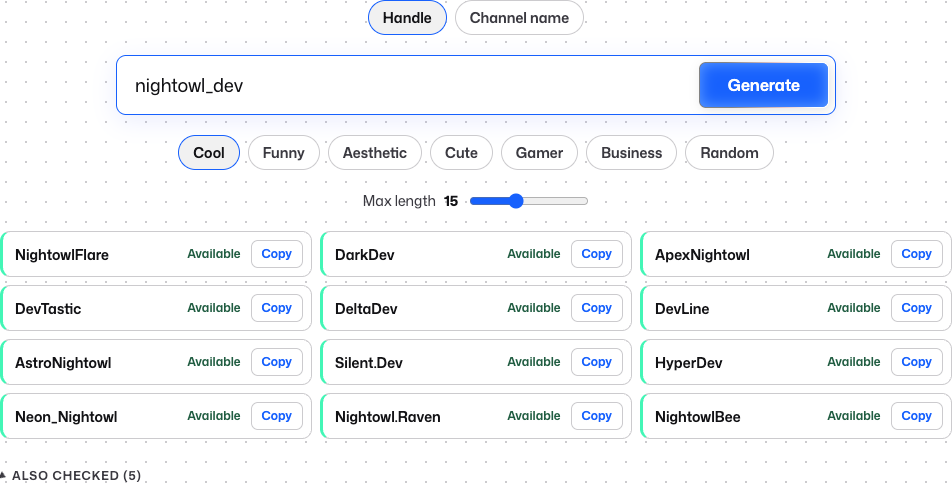 Handle mode: each idea checked live on YouTube on November 17, 2026. Available isn’t a guarantee that YouTube will accept the handle.
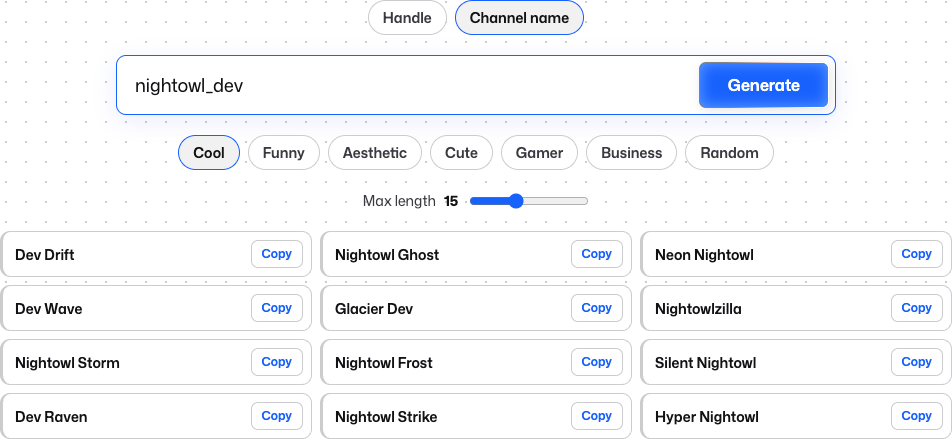 Channel name mode: names with spaces and capitals, not checked, because channel names don’t have to be unique.
YouTube Handle Rules
YouTube’s handle guidelines say a handle:
- Is 3 to 30 characters long. Some scripts have their own limits: 1 to 10 characters for Han and Hangul, and 2 to 20 for Ethiopic, Hiragana and Katakana.
- Uses letters or numbers. Underscores, hyphens, periods and Latin middle dots are allowed, but not at the start or end.
- Isn’t case-sensitive, so @NightOwl_Dev and @nightowl_dev are the same handle.
- Can’t look like a web address or a phone number.
- Can’t already be in use.
- Must follow YouTube’s Community Guidelines.
How to Change Your YouTube Handle
These are the steps YouTube Help gave when we checked on November 17, 2026. Menus change, and some older guides call the desktop page “Basic info” instead of “Profile”. If a label doesn’t match, check under Customization for Profile or Basic info.
On a Computer
- Sign in to YouTube Studio.
- Select Customization, then Profile.
- Under Handle, type your new handle.
- Click Publish.
Don’t skip Publish. YouTube Help says to click it to confirm the change.
On Android
- In the YouTube app, tap your profile picture.
- Tap View channel, then Edit.
- In the Handle section, tap Edit and type your new handle.
- Tap Save.
If the handle is taken, YouTube suggests a similar one.
On iPhone and iPad
The YouTube app works the same way as on Android. Tap your profile picture, then View channel, then Edit. In the Handle section, tap Edit, type the new handle and tap Save.
In the YouTube Studio app, tap your profile picture, then Edit. Tap Edit next to your handle, change it and tap Save.
How to Change Your YouTube Channel Name
The same menu note applies here: if you see “Basic info” instead of “Profile”, look there. Full steps for every device are on YouTube’s help page for changing your channel name and handle.
On a Computer
- Sign in to YouTube Studio.
- Select Customization, then Profile.
- Edit your Name.
- Click Publish.
On Android
- In the YouTube app, tap your profile picture, then View channel.
- Tap Edit next to your name.
- Type the new name and tap Save.
On iPhone and iPad
- In the YouTube app, open your channel.
- Under the channel description, tap Edit.
- Tap Edit next to your name, type the new name and tap Save.
In the YouTube Studio app, tap your profile picture, then Edit. Tap Edit next to your name, change it and tap Save.
Before You Rename
- Follow the rules. YouTube says the new name must follow its Community Guidelines.
- Give it time. YouTube says a new channel name may take a few days to show across YouTube.
- Verified channels lose the badge on a name change. YouTube Help says a renamed channel won’t be verified, and you’ll need to reapply. Changing only your handle won’t remove the badge.
- Can’t save the new name? YouTube Help says to delete any channel name translations first.
Limits and What Happens to Your Old Handle
YouTube Help sets the same limit for both names:
- You can change your handle twice within 14 days.
- You can change your channel name twice within 14 days.
YouTube’s page on changing your handle explains what happens to the old one. YouTube holds your previous handle for 14 days, in case you want to switch back. During that time, both your old and new handle links work. After that, other users can pick your old handle.
That matters if you’ve shared your old link in video descriptions or on other profiles. Our suggestion: update those links before the 14 days are up. Older custom links work differently: YouTube’s handle guidelines say any legacy personalized URLs you have will continue to work.
YouTube also says it “reserves the right to change, reclaim, or remove a handle at any time.” Handles that break its rules are revoked, and the channel gets a new one. Selling or transferring handles isn’t allowed.
“This Name Can’t Be Used” and Other Fixes
Your Handle Is Taken or Refused
YouTube says this usually means another channel has the handle, or it breaks the naming guidelines. Its advice: “try adding periods, numbers, or underscores.” Check the rules above too, since a handle that looks like a phone number or a web address won’t work.
To see whether a handle already belongs to a channel, look it up with our YouTube username search.
Your New Handle Doesn’t Show in Your Comments
YouTube Help doesn’t cover this case. Some people on Reddit report that signing out of YouTube and Google, then back in, made the new handle appear. On a computer, also check that you clicked Publish.
Hide Your Real Name or Change It for Privacy
A common worry is seeing your real first and last name on YouTube, sometimes in your comments. A new handle and channel name update what others see there. YouTube Help says channel name changes show only on YouTube, and changing your Google Account name doesn’t change your channel name.
There’s no option to hide just your handle. YouTube Help says to delete or hide the channel instead.
A few suggestions of our own when you pick new names:
- Leave out your real name, birthday and city.
- Remember that your old handle link still works for 14 days, then anyone can claim the handle.
- Pick something you’ll still like in a few years, since each name can only change twice in 14 days.
Changing Your YouTube Name vs Other Platforms
Not every app lets you change a username. Our guide to changing a Reddit username covers Reddit’s rules and what you can do instead. TikTok lets you change your username once every 30 days, and our guide to changing your TikTok username has the steps. Spotify’s help page offers no way to change the username at all, only the display name, as our Spotify username guide explains.
FAQ
Why can’t I find where to change my username in Settings?
YouTube Help points to a different place. On a computer, it’s in YouTube Studio under Customization, then Profile. In the app, tap your profile picture, then View channel, then Edit.
Can I get my old handle or channel name back?
Your old handle is held for 14 days, so you can switch back during that time if you haven’t used up your two changes. After that, other users can take it. For the channel name, you can change it again, up to twice within 14 days.
Will changing my YouTube name change my Google Account name?
No. YouTube Help says channel name changes show only on YouTube, and changing your Google Account name doesn’t change your channel name.