Last updated:
How to Change Your Minecraft Username (Java and Bedrock)
How you change your Minecraft username depends on where you play. There isn’t one Minecraft name: Minecraft Help says your in-game name is tied to the version you play or the console you use.
In this guide, “username” means your in-game name. On Java Edition that’s your profile name, and on Bedrock Edition with a Microsoft account it’s your Xbox gamertag. The change steps below come from Minecraft Help and Xbox Support, checked on November 17, 2026.
Quick Answer
On Java Edition, change your profile name on Minecraft.net (All Games, then Change Profile Name), up to 16 characters, once every 30 days. On Bedrock Edition with a Microsoft account, your name is your Xbox gamertag: the first change is free, and later ones cost a fee that varies by region. On Switch, it’s your Nintendo account nickname. On PlayStation, it’s your PSN online ID unless you sign in with a Microsoft account, which switches it to your gamertag.
Which Minecraft Name Do You Have?
Work this out first, because each name is changed in a different place. This table follows Minecraft Help’s page on in-game profile names.
| Where you play | Which name shows | Where you change it |
|---|---|---|
| Java Edition | Your Java profile name. It isn’t your gamertag, though the two can be the same | Minecraft.net |
| Bedrock Edition with a Microsoft account | Your Xbox gamertag | Xbox.com or an Xbox console |
| Nintendo Switch | Your Nintendo account nickname | Your Switch profile page |
| PlayStation | Your PSN online ID, or your Xbox gamertag if you sign in to Minecraft with a Microsoft account | PlayStation for the online ID, Xbox for the gamertag |
Pick Your New Name First
On Bedrock, your first gamertag change is the free one. Xbox Support says every change after that requires a fee. On Java, you have to wait 30 days before you can change again. Either way, decide on the name before you save it.
Keep the length limits in mind. Java profile names can be up to 16 characters. Gamertags can be up to 15 characters, including spaces, and can’t start with a number.
For ideas, our username generator suggests names from a word you type. You can pick a style, such as Gamer, and set a max length. It doesn’t check Minecraft names, because Minecraft isn’t one of its platforms. So confirm the name on Minecraft.net or Xbox when you make the change.
In our test on November 17, 2026, we typed the made-up word nightowl_dev into the generator. With Platform set to Any, Style set to Cool and Max length at 15, it listed 12 ideas, such as hyper_nightowl and nightowldrift.
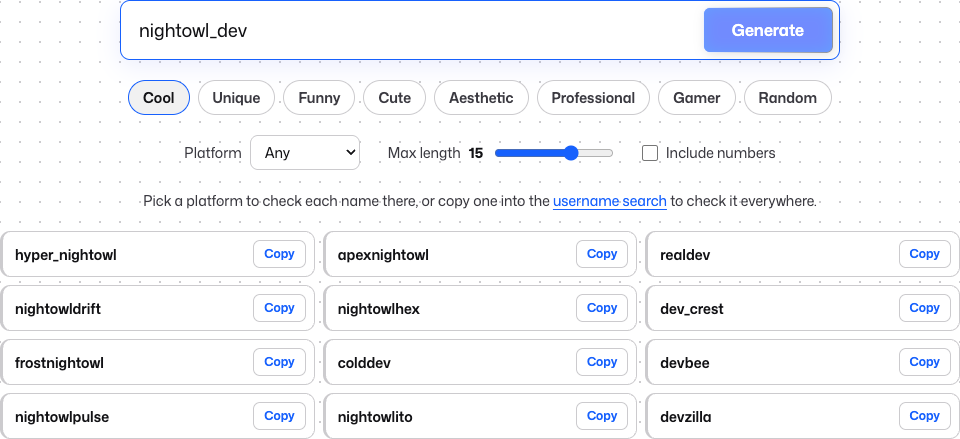 Name ideas only. Our generator doesn’t check Minecraft names, so confirm any name on Minecraft.net or Xbox before you count on it.
How to Change Your Java Edition Username
Minecraft Help gives these steps:
- Go to All Games on Minecraft.net and sign in with your Microsoft account.
- Under Minecraft: Java Edition, select Change Profile Name.
- Enter your new profile name.
- Select Change Your Profile Name to finish.
Java profile names can be up to 16 characters. Menus change, so if a label doesn’t match, follow Minecraft Help’s article on changing your profile name.
The 30-Day Rule
Minecraft Help says you can change your Java profile name once every 30 days. If you change your mind, you can go back to your old name after waiting 30 days. Some guides say Java name changes aren’t limited, but that doesn’t match Minecraft Help.
How to Change Your Bedrock Username (Xbox Gamertag)
On Bedrock Edition with a Microsoft account, your in-game name is the gamertag on your Xbox/Microsoft account, so you change it through Xbox.
On the Web
These are the steps on Xbox Support’s change gamertag page:
- Sign in to your account on xbox.com.
- Select your gamerpic in the top-right corner, then select View full profile.
- Select the edit icon next to your gamertag.
You can also go to Settings > Account > Change gamertag. Minecraft Help’s page uses different wording: Xbox.com, then My Account, then the pencil icon next to Gamertag. If the labels don’t match what you see, go by Xbox Support, which has the fuller steps.
Xbox Support says that once you confirm, the new gamertag is reflected across Xbox.
On an Xbox Console
Minecraft Help gives these steps:
- Press the Xbox button on your controller and select Profile & system.
- Select your Xbox profile, or select Choose a profile and sign in.
- Select My profile > Customize profile.
- Select your current gamertag to change it.
What It Costs
Xbox Support says your first gamertag change is free. After that, all future changes require a fee, and the cost varies by region and currency. It doesn’t give a price, so we don’t either.
On Bedrock, your gamertag is your Minecraft name, so a second rename means paying the fee.
Length and the Number Suffix
Gamertags can be up to 15 characters, including spaces, and can’t start with a number. Xbox’s gamertag FAQ adds one more rule: if a gamertag is already taken and is 12 characters or fewer, a suffix with numbers is attached.
That suffix is why some gamertags end in digits. To avoid it, pick a gamertag no one else has.
Change Your Name on Switch and PlayStation
Nintendo Switch
Minecraft Help says your in-game name on Switch is your Nintendo account nickname. To change it:
- Start your Switch.
- Select your profile page in the top-left corner.
- Go to the Profile tab.
- Select the pencil icon next to your profile name.
PlayStation
On PlayStation, Minecraft Help says your in-game name is your PSN online ID. If you sign in to Minecraft with your Microsoft account, it changes to your Xbox gamertag. Signing out of your Microsoft account on PlayStation switches it back to your PSN online ID.
So first decide which name you want to show. For the gamertag, sign in with your Microsoft account and change it with the Xbox steps above. For the PSN online ID, use PlayStation’s own account settings and help. This guide doesn’t cover PSN online ID changes or what they cost.
On Phones, Tablets and Windows
Minecraft Help doesn’t give separate steps for phones, tablets or Windows. If you play Bedrock Edition signed in with a Microsoft account, your name is your gamertag, so use the Xbox steps above. If you play Java Edition, use the Minecraft.net steps.
Changed It but the Old Name Still Shows?
- Check that you changed the right name. Java uses your profile name, and Bedrock with a Microsoft account uses your gamertag. Minecraft Help treats them as separate names, so make sure you changed the one for the edition you play.
- On PlayStation, check your sign-in. Your gamertag only shows while you’re signed in with your Microsoft account. Signed out, you see your PSN online ID.
- Try signing out and back in. Restarting the game or launcher may also help. These tips don’t come from Minecraft Help or Xbox Support. If another app or launcher that signs in with your account still shows the old name, try the same there.
- The Minecraft.net button doesn’t work? Try again later, or follow the steps in Minecraft Help’s article.
Don’t Know Which Microsoft Account You Use?
To change a Java name, you sign in to Minecraft.net with your Microsoft account. Your Bedrock gamertag belongs to your Xbox/Microsoft account. Lost track of which account you use? Here’s how to recover a Microsoft account username.
Using the Same Name Elsewhere
Many players use one name for their games and streams. For ideas on other platforms, try the Roblox username generator or these Twitch username ideas. Posting clips too? Here’s how to change your YouTube username. Playing Fortnite as well? Your name there is your Epic display name, and our guide shows how to change your Fortnite username. Neither generator checks Minecraft names.
Use This Responsibly
Only change the name on your own account, or on your child’s account with them. This guide isn’t for getting into or finding another player’s account. A matching name on another platform isn’t proof that it’s the same person.
FAQ
Can you change your Minecraft username for free?
On Bedrock with a Microsoft account, yes, once: your first gamertag change is free, and Xbox Support says later ones require a fee. On Java, Minecraft Help’s steps mention no fee, only the limit of one change every 30 days.
How often can you change your Minecraft username?
On Java, once every 30 days. For gamertags, Xbox Support says only that every change after the first one requires a fee.
Can you go back to your old Minecraft name?
On Java, yes. Minecraft Help says you can go back to your old profile name after waiting 30 days. We couldn’t confirm from Xbox Support whether you can get an old gamertag back.
Why does my Minecraft name have random numbers after it?
On Bedrock with a Microsoft account, your name is your gamertag. Xbox’s gamertag FAQ says that if a gamertag is already taken and is 12 characters or fewer, a suffix with numbers is attached.
Why is my Minecraft name different on PlayStation?
Minecraft Help says it shows your PSN online ID, unless you sign in to Minecraft with your Microsoft account. Then it shows your Xbox gamertag instead.
Does my Java name have to match my gamertag?
No. Minecraft Help says your Java profile name isn’t your gamertag, although the two can be the same.
Can I change my kid’s Minecraft name?
The name belongs to the account your child plays with. On Bedrock with a Microsoft account, that’s the gamertag on their account: the first change is free, and Xbox Support says later ones require a fee. On Java, it’s the profile name you change on Minecraft.net.