Last updated:
How to Change Your Fortnite Username (Epic Display Name)
Here’s how to change your Fortnite username on PC, mobile, Switch, PlayStation and Xbox. The Epic steps come from Epic’s help pages, and the console details come from PlayStation’s and Xbox’s own support pages, all as they read on November 17, 2026.
Quick Answer
Your Fortnite username is your Epic Games display name, and you change it on the Epic Games website. Open your Account settings, enter a new name in the Display name box and select Continue. You can change it once every two weeks, and the name must be 3 to 16 characters. On PlayStation and Xbox, your console name can still show, and you change that on the platform instead.
Which Fortnite Name Shows Where
Epic calls your Fortnite name your “display name.” In this guide, “username” and “display name” mean the same thing.
Epic’s help page says the display name appears on the Epic Games Launcher, Epic’s forum and AnswerHub. It also appears when you play Epic’s games on PC, Mac, Switch or mobile. Changing it doesn’t change your PSN ID or Xbox gamertag, so your in-game name may differ on those consoles.
| Platform | Name that shows | Where you change it |
|---|---|---|
| PC | Epic display name | Epic Games website |
| Mobile | Epic display name | Epic Games website |
| Nintendo Switch | Epic display name | Epic Games website |
| PlayStation | Can differ from your Epic display name | PlayStation (your PSN online ID) |
| Xbox | Can differ from your Epic display name | Xbox (your gamertag) |
Reddit threads show the mix-up this causes: a player changes the name on Epic, then the console still shows the old one. Both names are real, and you change each one in its own place.
Before You Change It
Verify Your Email
Epic’s help page says you must verify your email address before you can change your display name.
Console-Only Players: Finish Your Epic Account First
If you’ve only played on PlayStation, Xbox or Switch, your Epic account may not be complete yet. Epic says to sign in on the Epic Games website by choosing the platform you play on. Then enter the sign-in details for that console account.
Next, Epic asks you to fill in the missing details under “Finish Setting Up Your Account.” After that, you can set a display name.
Pick a Name That Follows Epic’s Rules
Epic’s display name rules say a name must be 3 to 16 characters. It can’t contain:
- Vulgarity, hate speech, or offensive or derogatory language
- Direct references to any Epic Games employee, product, service or character
- Private personal information, such as phone numbers, addresses or real names
Epic says a name that breaks these rules might be reset to a random one later, or not accepted at all. The rules page doesn’t list which characters are allowed, so we can’t say which symbols work.
Need ideas? Our username generator has a Gamer style, and its default length of 15 characters fits Epic’s limit.
How to Change Your Fortnite Username on PC, Mobile and Switch
Epic’s help page says to change the name on the Epic Games website. It gives these steps:
- Sign in to the Epic Games website and go to your Account settings page.
- In the box labeled Display name, enter your new display name.
- Select Continue.
The new name then shows in Fortnite on PC, Switch and mobile. Menus change over time, so if a label looks different, Epic’s help page has the current steps.
The Two-Week Limit
Epic lets you change your display name once every two weeks. If you see a lock icon and can’t edit the name, you’ve likely changed it in the last two weeks. Hover over the i icon beside your current display name to see when you last changed it.
How to Change Your Name on PlayStation
Epic says to change your PSN ID, which PlayStation calls your online ID, on PlayStation itself. PlayStation’s help page has the steps and says:
- The first change is free. A charge applies for later changes.
- You can change your online ID as many times as you want.
- Online IDs can’t be changed on child accounts.
- If you have technical issues, you can switch back to your original ID for free.
- PlayStation 4 games may have issues after an online ID change.
PlayStation’s list of games tested with the online ID change puts Fortnite under “no known issues,” though it notes that tested games can still have problems.
How to Change Your Name on Xbox
Epic says to change your Xbox gamertag on Xbox itself. Xbox Support says:
- Your first gamertag change is free.
- After that, every change costs a fee, which varies by region and currency.
- Gamertags can be up to 15 characters, including spaces.
- A gamertag can’t start with a number.
Want the same name on Xbox and Epic? Pick one that’s 3 to 15 characters long and doesn’t start with a number, so it fits both length limits.
Why Your New Fortnite Name Isn’t Showing
The Switch lobby still shows the old name. If the new name shows correctly in-game but not in the lobby, Epic’s Switch help page says to restart Fortnite. If that doesn’t fix it, restart your Nintendo Switch.
PlayStation or Xbox still shows your console name. That’s expected. Changing your Epic display name doesn’t change your PSN ID or gamertag. Change those on the platform, as above.
You see a lock icon. You’ve likely hit the two-week limit described above.
The name was rejected or reset. Check it against Epic’s rules above.
Epic shows a name you don’t recognize, or says your email is already used. Players ask about both on Reddit. We couldn’t find an Epic help page that explains either case, so contact Epic Games support rather than guessing at a fix.
Name Ideas That Fit Epic’s Rules
Since you can only change your display name once every two weeks, try a few ideas before you commit. Some tips of our own:
- Stay within 3 to 16 characters. Shorter names are easier for squadmates to read and type.
- Leave out personal details. Epic’s rules bar real names, phone numbers and addresses, and your privacy is safer without them.
- Say it out loud. A name that’s easy to call out in voice chat works better in a squad.
Our tools can’t check Epic names, so try your ideas in Epic’s Display name box. For ideas to start from, our username generator has a Gamer style. In our test on November 17, 2026, we typed nightowl_dev with the platform set to Any, the Gamer style and a max length of 16, and got names like nightowlninja, glitchdev and devstorm.
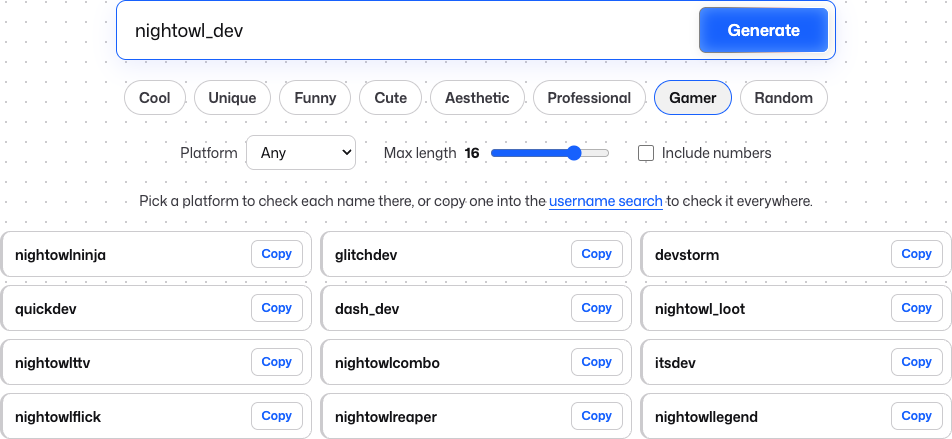 Name ideas from our username generator on November 17, 2026. Ideas only, not checked against Epic.
Use the Same Name on Other Platforms
If you stream or post clips, a matching name helps viewers find you. The Twitch username generator suggests Twitch names and has a Gamer style.
Changing names elsewhere too? Our guides cover how to change your YouTube username and how to change your TikTok username. If you also play Minecraft, its name works differently on Java and Bedrock, as our guide to changing your Minecraft username explains.