Last updated:
How to Change Your Spotify Username (and What to Do Instead)
Can you change your Spotify username? Not by any route Spotify’s help page shows. You can change your display name, the name people see. Here’s how the two names differ, how to change the display name and what to do if you want a new username.
Need ideas for a new display name? Our free username generator suggests names from a word you like. It has no Spotify option and doesn’t check names on Spotify, so treat the list as ideas only.
Quick Answer
Spotify’s help page doesn’t give any way to change your username. It points you to your display name instead, which replaces the username wherever it shows on your profile, in the app and on playlists. The accepted answer on Spotify’s Community forum (from a member, not Spotify staff) says usernames are randomly generated and can’t be changed. To change the name people see, tap your profile picture, View profile, EDIT, tap your display name, then Save.
Can You Change Your Spotify Username?
Spotify’s help page on usernames and display names has two parts: one on your username and one on your display name. It doesn’t say whether the username can be changed, and it gives no steps to change it. What it does say is that your username “is designed to identify you on Spotify, and you don’t need it to log in.”
The plainest answer comes from Spotify’s Community forum. In July 2024, a community member (not Spotify staff) posted the accepted answer in a thread about changing usernames. It says: “usernames can no longer be custom … they are simply randomly generated. The username serves to uniquely identify your account in the system and that’s why it cannot be changed.”
It isn’t an official statement, but it fits the help page, which offers no way to change the username on a phone or a computer. We read both pages on November 17, 2026, and found no statement from Spotify about allowing username changes in the future.
Spotify Username vs Display Name
Your Spotify account has two names. This table sums up what Spotify’s help page says about each.
| Username | Display name | |
|---|---|---|
| What it is | The name that identifies your account on Spotify | The name people see in place of your username |
| Where it shows | On your profile, in the app and on playlists, unless a display name (or, if you connected Facebook, your Facebook name) shows instead | On your profile, in the app and on playlists. Spotify’s Community FAQ adds Friend Activity |
| Can you change it? | Spotify’s help page gives no way to | Yes, from your profile |
| Can it log you in? | No. Since September 1, 2026, Spotify says you log in with your email address, not your username | No. Spotify says you can’t use it to log in |
So when someone looks at your profile or one of your playlists, the display name is the one that matters. Reddit also has a username and a separate display name, as our guide to changing a Reddit username explains. TikTok, by contrast, lets you change your username once every 30 days, as our guide to changing your TikTok username shows.
How to Change Your Spotify Display Name
These steps come from Spotify’s help page. Apps change their menus, so the labels in your app may look a little different. We checked the steps on Spotify’s pages on November 17, 2026, but we didn’t run them ourselves.
On Your Phone
Spotify’s help page gives one set of mobile steps, with no separate version for Android or iPhone.
- Tap your profile picture at the top.
- Tap View profile.
- Tap EDIT.
- Tap your display name to change it.
- Tap Save.
On a Computer
- Click your profile picture at the top and select Profile.
- Click your profile name and edit it.
- Click SAVE.
Spotify’s help page gives these steps for desktop. We couldn’t confirm whether the web player at open.spotify.com works the same way.
Why You Can’t Log In With Your Username
Spotify’s help page says you don’t need your username to log in. Instead, it says to “use your email address and password, or log in with the method you used to sign up (ex. Apple or your phone number).”
Spotify’s help page on changing how you log in sets a date: after September 1, 2026, you log in with your email address, not your username. It also says you can check your email address on your Account page.
Your display name can’t log you in either. If you also forget usernames on other apps, our walkthrough for finding your username on other apps covers those.
If You Really Want a Different Username
Start a New Account
The Spotify help pages we read don’t cover moving to a new account to get a new username. It’s a workaround people describe on Spotify’s Community forum, not an official option.
Before you try it, keep two things in mind:
- The accepted Community answer above says new usernames are randomly generated. If that’s right, a new account gets a new username, but not one you choose.
- We couldn’t confirm what carries over to a new account, such as playlists, liked songs, followers or listening history. Read Spotify’s own help pages before you close or delete anything.
For most people, a new display name on the existing account is the simpler fix.
Pick the New Name First
On any Spotify account, the display name is the name you can set and change. A few tips for choosing one:
- Leave out your real name, birthday or city if you don’t want the name to point to you.
- Keep it easy to read and spell, so friends recognize it.
- Stay within 30 characters, the display name limit in Spotify’s Community FAQ.
In our test on November 17, 2026, we entered nightowl in our username generator with the platform set to Any. It listed twelve name ideas, such as nightowlnexus and ashnightowl.
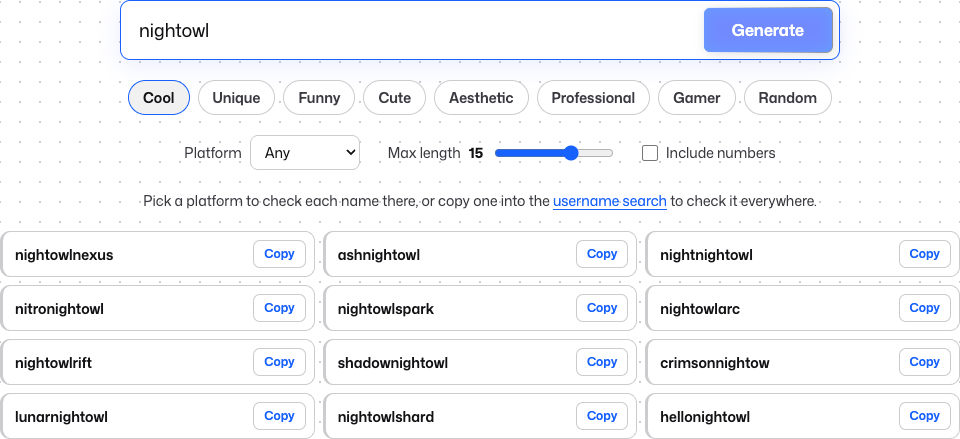 Name ideas from our username generator for the keyword nightowl. This is not a Spotify result: the generator has no Spotify option and doesn’t check names on Spotify.
If Your Username Shows Your Real Name
Spotify’s help page says a display name “replaces the username where it shows on your profile, app, and playlists.” So if your username shows your real name or an old name, setting a display name covers it in those places.
If you connected Facebook, Spotify’s help page says your Facebook name can show, but a Spotify display name shows instead of it.
What other people see also depends on your privacy settings. We couldn’t confirm every place a username may still appear. Profile links are one example: people on forums disagree about whether the username shows in them.
Use This Responsibly
This guide is about your own Spotify account. A matching name on another site isn’t proof it’s the same person. Respect privacy settings, and never create fake accounts to see private profiles.
FAQ
Is my Spotify username permanent?
Spotify’s help page gives no way to change it. The accepted answer on Spotify’s Community forum, from a member rather than Spotify staff, says it can’t be changed.
Why is my Spotify username random?
The accepted Community answer says new usernames are randomly generated. We found no official reason from Spotify. Not every account has a generated one: Spotify’s Community FAQ on display names mentions people who “already have a customized username.”
How long can my display name be, and how often can I change it?
Spotify’s Community FAQ on changing your display name says: “The character limit for a display name is 30. You can change your display name as many times as you want to.”
Is my Spotify Community username the same as my Spotify username?
No. The Community forum has its own username. Spotify’s Community FAQ on changing it says: “Keep in mind that updating this only affects the Community.”